HTTP Debugger Pro is a native Windows sniffer for developers and QA teams who need system-wide HTTP and HTTPS capture without routing applications through a local proxy. The installer is just 12.6 MB and, unlike Fiddler and other similar tools, requires no .NET runtime and no Electron bundle.
Why use a proxy-less Fiddler alternative on Windows?
Beyond the commercial-use restriction, a proxy-based capture model has technical drawbacks of its own. Fiddler and similar tools capture traffic by running a local proxy and registering it as the Windows system proxy. Those settings have to be restored on exit; when they are not, traffic still goes to a proxy that is gone. Another drawback is that some applications ignore the system proxy settings and connect directly to the internet — legacy apps, CLI tools, and clients with their own proxy configuration — so their traffic never appears in the capture.
HTTP Debugger Pro takes a different approach to capturing traffic. It does not run a proxy server on your machine, does not open a listening port, and unlike a proxy-based sniffer it captures those applications too. This approach preserves corporate proxy, PAC, and VPN routing, inspects inbound localhost server requests, and attaches process and connection metadata to each session.
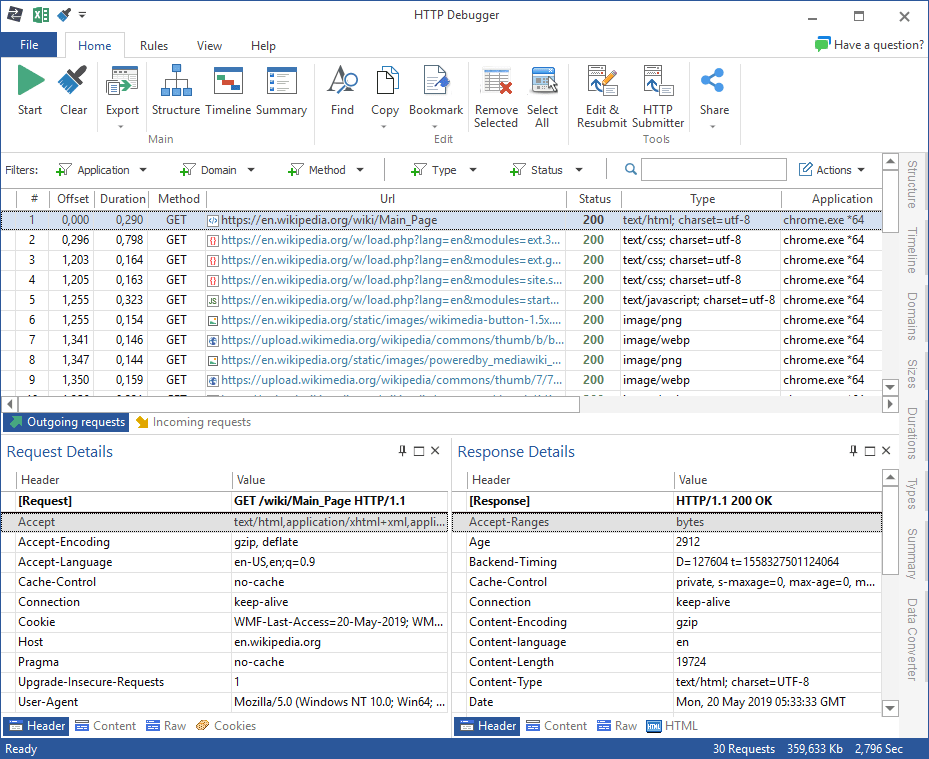
What HTTP Debugger Pro can inspect and change
HTTP Debugger Pro comes with a rich set of tools for inspecting and changing traffic: headers, cookies, bodies, timings, sizes, and process metadata, decrypted HTTPS, and capture of HTTP/1.x, HTTP/2, WebSocket, SSE, and gRPC. Traffic can be searched, filtered, edited, resent, or modified with rules, and sessions saved or exported as reports.
Common HTTP debugging workflows
- Troubleshoot third-party API integrations — see the exact request your code sends and the API's real response.
- Optimize your API and desktop apps — find slow and large calls that browser devtools never see.
- Debug WebSocket, SSE, and gRPC streams — read individual frames, events, and messages.
- Debug AI agents and MCP servers — see what they send and receive on localhost.
- Reproduce edge cases — edit a captured request and resend it, or fake the response with a rule.
- Let an AI assistant read the capture — connect Claude Code or Codex through the built-in MCP server.
HTTP Debugger Pro vs Fiddler Classic
Both tools solve the same problem on Windows, but in different ways:
| Capability | HTTP Debugger Pro | Fiddler Classic |
|---|---|---|
| Capture architecture | Windows service and protocol-level capture | Intercepting HTTP proxy |
| System proxy changes | No changes required | Becomes the system proxy |
| Applications without proxy support | Captured directly | Not captured |
| Corporate proxies and VPNs | Fully compatible | Requires configuration |
| HTTP protocol versions | HTTP/1.x and HTTP/2 | HTTP/1.x only |
| Streaming and RPC protocols | WebSocket, SSE, and gRPC | WebSocket only |
| Built-in MCP server | Yes | — |
| License model | Paid perpetual license | Commercial use not permitted |
| Development status | Actively maintained | No longer developed |
For a deeper look at the capture models, read the no-proxy vs proxy HTTP debugging comparison.
Perpetual license vs subscription
HTTP Debugger Pro is sold under a perpetual license. The current published price is $129 per seat before volume discounts, paid once for continued use of the purchased version. Current volume tiers apply 10% for 5–9 seats, 15% for 10–24 seats, 20% for 25–49 seats, 25% for 50–99 seats, and 30% for 100 or more seats.
Fiddler Everywhere uses a subscription license. According to the Fiddler Everywhere EULA, an active subscription is required to continue using the product, subscriptions renew automatically unless auto-renewal is disabled, and access ends when the subscription ends.
| Seats | HTTP Debugger, 3 years, no renewals | HTTP Debugger with renewals, 3 years | Fiddler Everywhere, 3 years |
|---|---|---|---|
| 1 | $129 | $307 | $468 |
| 5 (10% off) | $581 | $1,382 | $2,340 |
| 20 (15% off) | $2,193 | $5,219 | $9,360 |
| 50 (25% off) | $4,838 | $11,513 | $23,400 |
An HTTP Debugger Pro license includes one year of updates; the renewals column adds a $89 renewal per seat for each remaining year, at the same volume discount. Fiddler Everywhere Pro at $13 per user per month billed annually, the tier comparable to HTTP Debugger Pro. Based on public prices verified on 2026-08-12.
FAQ: HTTP Debugger Pro vs Fiddler
Is HTTP Debugger Pro a proxy server?
No. HTTP Debugger Pro is not a proxy server and does not set itself as a system proxy. It uses a different approach to capture HTTP/HTTPS traffic, which helps avoid proxy-related network issues and conflicts with corporate proxies or VPN clients.
Can Fiddler and HTTP Debugger Pro run on the same computer?
Yes. Because HTTP Debugger Pro is not a proxy and uses a different capture mechanism, it can run side by side with Fiddler on the same Windows machine.
Is there a perpetual-license alternative to Fiddler Everywhere?
Yes. HTTP Debugger Pro is a perpetual-license alternative to Fiddler Everywhere for Windows. Its current price is $129 per seat before volume discounts, paid once for continued use of the purchased version, with no subscription.
Can I import my Fiddler sessions into HTTP Debugger Pro?
Yes. HTTP Debugger Pro can import HAR 1.1/1.2 files and unencrypted Fiddler Classic SAZ archives with HTTP and HTTPS request-response sessions. It imports supported AutoResponder.xml and FARX rules, plus exact FFX and Quick Filter mappings; rules start disabled in a rules profile of their own. Encrypted SAZ, Classic WebSocket payloads, scripts, and Fiddler Everywhere data are not imported.
Will HTTP Debugger Pro see traffic from applications that do not support proxies?
Yes. Capture does not depend on the application's proxy support — HTTP Debugger Pro reads the traffic of any Windows process, whether it goes through a proxy or straight to the internet.
Does HTTP Debugger Pro work with VPNs and corporate proxies?
Yes. HTTP Debugger Pro can capture traffic over LAN, Wi-Fi, other network adapters, and VPN tunnels, and it can also monitor applications whose traffic is already routed through an upstream or corporate proxy.
What platforms does HTTP Debugger Pro support?
HTTP Debugger Pro is designed for Windows desktops and servers and supports Windows 10 and Windows 11, both 32-bit and 64-bit. There is no macOS or Linux build.